Geocoding

Geocoding is the process of converting addresses into geographic coordinates, which you can use to place markers on a map, or position the map. Reverse geocoding, on the other hand, is the process of converting geographic coordinates into a human-readable address. These processes are essential in various fields, including logistics, real estate, and in the development of applications that require location services.

For my project, I use geocoding in the most common way as it is found around the web. I convert a user’s address query into coordinates, in order to set the maps position to those coordinates.

Integrating Geocoding with UI Elements

When designing a user interface that incorporates geocoding, there are several key considerations to ensure that the user experience is fluid and efficient.

  • Address Input Fields The design of the address input field is crucial. It should be prominently placed and easy to use. Implementing an auto-complete feature that suggests addresses based on the user’s input as they type can significantly reduce the entry time and improve the accuracy of the data provided.
  • Feedback and Error Handling Providing clear feedback is essential, especially when the address cannot be geocoded. The UI should inform users of the problem and, if possible, provide suggestions or alternatives. This can involve highlighting errors directly in the input field or offering a list of possible corrected addresses.
  • Responsive Map Updates The map should respond dynamically as the address is being confirmed. Once the geocoding process is complete, the map should update immediately to show the exact location, ideally with a marker or other visual representation. If the location is broad, such as a city or region, the map can automatically adjust the zoom level to encompass the entire area.

Case Studies Demonstrating the Power of Geocoding

  1. Logistics and Delivery: A leading delivery service company integrated a geocoding API to improve delivery times by 15%, enhancing customer satisfaction and reducing operational costs. This integration exemplifies the impact of efficient geocoding in logistics.
  2. Real Estate: Geocodio powers thousands of real estate applications, providing geocoding services that transform addresses into geographic coordinates. This capability allows for the integration of location data, school districts, and more into real estate platforms, significantly enhancing user experience and operational efficiency.
  3. Public Health: During the COVID-19 pandemic, a public health organization utilized geocoding to map the spread of the disease, effectively allocating resources to heavily impacted areas. This use of geocoding significantly helped in controlling the spread, showcasing its value in public health crises.
  4. Healthcare Logistics: In a critical healthcare scenario, Noatum Logistics managed the timely shipment of syringes from China to Peru for the COVID-19 vaccination campaign, demonstrating the crucial role of geocoding in global health responses.

AI and geocoding

Artificial Intelligence can play an important role in advancing the capabilities of geocoding technologies. By integrating machine learning models, we can significantly enhance the accuracy and efficiency of converting addresses into geographic coordinates. This is particularly valuable in areas with less standardized addressing systems.

One of the most compelling applications of AI in geocoding is in error correction. Machine learning algorithms can learn from vast datasets of addresses and their corrections, enabling them to predict and correct user input errors automatically. This not only improves the user experience but also ensures that the map positioning is as accurate as possible, even when the initial user input is flawed.

AI also enables predictive location services, where the system anticipates the user’s intended destination based on partial address inputs and historical data. This functionality is not only about convenience; it’s about creating a seamless interaction where the map interface feels intuitive and responsive to the user’s needs.


https://www.iplocation.net

https://www.geocod.io/real-estate-geocoding

“Intergenerational Digital Storytelling” | 05.2

I did a few more pages, and maybe like 17 more pages for the drop-down menus. You know how I said that I’m figuring out Figma on my own? Well, let’s just say that Figma really isn’t my friend. After doing all that, I decided I didn’t like any of it, so I deleted it all, lol. When I say that Figma is not being my friend, I mean it—Figma 👏 is 👏 not 👏 my 👏 friend!

Anyways, enough with the negativity. I took a new approach and made a page with a questionnaire to fill out when adding a parent. That type of questionnaire will be present for all family members that you would like to add. Of course, they won’t all be the same, though some questions might be repeated. In addition to this page, I created another one with some additional questions for when a certain family member is, unfortunately, no longer alive.

I will continue with making drop-down menus for these pages. After I’m done with that, I will add the ‚My Profile‘ section as well as the sections for adding siblings and grandparents.

‚Till next entry, bye!

Double Diamond #8 // The Double Diamond and Design Thinking: Understanding the Differences and Similarities.

The Double Diamond is a model for Design Thinking that helps innovators to navigate a design project from concept to completion.

https://makeiterate.com/the-double-diamond-framework-for-design-thinking/

Design Thinking and the Double Diamond are both popular frameworks in the design world. They help solve problems and create innovative solutions, but they do so in slightly different ways. Let’s explore what each framework is, how they are similar, and how they differ.1

What is Design Thinking?

Design Thinking is a human-centered approach to problem-solving and innovation. It includes five phases:

  1. Empathize: Understand the user’s needs through research and observation.
  2. Define: Clearly articulate the problem based on gathered insights.
  3. Ideate: Generate a wide range of ideas and potential solutions.
  4. Prototype: Create simple models of the potential solutions.
  5. Test: Evaluate the prototypes with real users and make improvements based on feedback​.

Design Thinking emphasises empathy, creativity, and iterative testing to ensure solutions are user-centered and effective.

What is the Double Diamond?

The Double Diamond framework visualises the design process through two diamonds, each containing two phases:

  1. Discover: Research to understand the problem space broadly.
  2. Define: Narrow down insights to a clear problem statement.
  3. Develop: Generate, prototype, and test multiple solutions.
  4. Deliver: Finalize and implement the best solution.

This framework focuses on divergent (exploring many ideas) and convergent (refining ideas) thinking, ensuring a thorough understanding of the problem and a focused approach to the solution.

Similarities

  • User-Centered: Both frameworks prioritize understanding the user’s needs and problems.
  • Iterative Process: Each involves cycles of prototyping and testing to refine solutions.
  • Phased Approach: They both divide the design process into distinct phases to manage complexity and ensure thorough exploration and refinement of ideas.

Differences

  • Structure: Design Thinking is typically depicted as a linear process with five steps, while the Double Diamond is shown as two diamonds with four phases, emphasising the divergence and convergence of ideas​.
  • Terminology and Emphasis: Design Thinking focuses on empathy and ideation early on, with specific phases for prototyping and testing. The Double Diamond, on the other hand, splits the process into two main areas—problem space and solution space—each with divergent and convergent phases​.
  • Flexibility vs. Structure: Design Thinking is often seen as more flexible and adaptable to various contexts and problem types. The Double Diamond offers a more structured approach with distinct phases for different types of thinking (divergent and convergent).

Conclusion

Design Thinking and the Double Diamond are powerful tools for solving complex problems and fostering innovation. Design Thinking is ideal for projects that require deep empathy and ideation, while the Double Diamond provides a structured approach to explore and refine solutions thoroughly. Understanding these frameworks and knowing when to use each can significantly enhance the design process, ensuring more effective and user-centered outcomes. For my project, a further consideration and approach would be whether it might be possible to combine both concepts and whether they should be included together to create a flexible and convincing planning tool.

  1. https://makeiterate.com/the-double-diamond-framework-for-design-thinking/ ↩︎

20 | Demo-Video of my game

I’m excited to share with you a video demonstration of my adaptation of the classic board game “Mensch ärgere dich nicht.” In this version, I’ve added a unique twist focused on sustainability and environmental education. Below is a video that walks you through the game. Please note that the audio and video quality might not be the best since I didn’t have professional equipment. Also, the video is in German, as the players were German speakers, and this made the most sense for the context. A detailed description of how the game is played can be found in blog post 17.

Unfortunately I can’t upload the video here because of the file size, but you can watch it here:
https://drive.google.com/file/d/1Fuqhzb4c88gWCH78gK7VYMnc6Bxh1T-y/view?usp=drive_link

In the video, you can see how the game incorporates special event fields and sustainability-themed event cards. Children learn more about environmental consciousness and sustainable decisions through various events and questions. The collection of environmental points helps reinforce the idea that sustainable actions are rewarded and crucial for overall victory.

Based on the feedback from my recent user testing, here are some potential additions and changes I might incorporate in the future to improve the game:

  • Create additional questions with multiple-choice answers (e.g., a, b, c) for questions like „Why is recycling important?“ or „Why is it better to buy local food?“
  • Incorporate more penalties to add variety, such as skipping a turn in the next round or having to go backwards.
  • Allow players to use excess environmental points in creative ways.
  • Integrate energy-saving fields more thoroughly into the gameplay or consider removing or changing them to something else for simplicity.
  • Separate questions and good/bad news cards, assigning them to different event fields to ensure both types are used effectively.

Creating this game has been a great journey so far, and the feedback from user testing has been very valuable. It’s clear that while the game is already fun and educational, there is room for improvement to make it even more engaging and meaningful. I hope you enjoy watching the video and that it gives you a good sense of how the game works. Remember, I don’t use gender-specific language in the video, but of course all players are included.

20 | Singing Aid – Prototype Video

Conclusion

At the beginning, I found it difficult to choose a topic and come up with a suitable idea. Eventually, I decided to focus on a new issue in my immediate environment. This led to the idea of a singing aid for choir rehearsals. My final prototype combines the visual preparation of existing technology in a new application area. I enjoyed experimenting and seeing how I could convey my idea without extensive technical know-how while also making it interactively adjustable. Now, I am looking forward to seeing if I receive feedback from my choirmaster and can continue to work on it, or how things will progress in general.

17/ Testing tactile photography on people

I gave my prototypes of tactile photography to 4 people. Here is what they answered to my questions:

1. Do you like it?

      A: Yes. It’s interesting/cool. You can touch it. I like it more when it is on some parts of the photography and not everywhere. I would touch the parts that are obviously a tactile part.

      B: Yes. It’s interesting that not only you can touch the photography, but you can feel it. I don’t like the dots on the photography – they annoy me. I don’t understand why there are tactile parts on the part of the photography where there’s nothing. It doesn’t make sense (”There are no clouds there on the photo!”).

      C: I do. I don’t like it when the tactile parts are on the back because it doesn’t give me any visual feedback.

      D: Yes. I don’t mind turning the photo. I especially like the experience when it’s incorporated in the photo.

      2. What’s the experience like?

        A: On some it’s interesting, on some it’s not. On some photographs I don’t like how it looks.

        B: It’s something new. Not everyone does this to the photography. It’s more interesting when the tactile part is in front and not in the back.

        C: Good. I like touching this. It adds a new element to the photography.

        D: Interesting. It reminds me of children’s books.

        3. What would make this better?

          A: I would like it more if the touching part would be only on one place on the photo (in the left corner), or on the place where there is actually something on the photo (e.g. on the tree, on the boat).

          B: I wouldn’t put dots on random places, but on some places that makes sense because otherwise it’s confusing.

          C: I don’t like the experience when the tactile parts are on the back. It doesn’t have the same effect.

          D: I like when it’s on the front and on the back, but not on every photo. It would be also interesting if the tactile part would be on visible parts (e.g. on the dog). But it would be also okay if it’s on blank parts as long as it makes sense. I can use my imagination.

          4. Would you prefer an album?

            A: Yes. But the ones that are really interesting and pretty I would rather have in hands. It would be interesting if tactile parts would be exaggerated more. It should stand out so that you want to touch it.

            B: No. I like the idea of having it in hands.

            C: This is more interesting and you can spend more time on touching things. It slows you down and makes you focus on the details

            D: No. I think this is more interesting.

            In conclusion, I should focus on the appearance of the tactile parts of the photograph because I don’t want the photographs to look bad and for people to no longer enjoy them. I believe that the photograph should be primary, and the tactile design should be secondary. It’s interesting how some of the participants like the idea of having tactile experience on the back, and some of them didn’t. Another thing that was thought-provoking is that this experience reminds of flipping through a children’s book. I will take this into consideration and search for some inspiration in children’s books.

            SEMESTERPROJEKT – ARBEITEN MIT DUIK

            Zu aller erst, dieser Blogpost fokussiert sich auf meine Reflexion mit der Arbeit mit Duik.

            Duik Ángela ist die neuste Version von Duik. In der Vergangenheit habe ich mich schon mal kurz mit Duik Bassel auseinandergesetzt. Da das aber schon etwas länger her ist, musste ich mich dem Werkzeug von Neuem annähern. Ohne das Zurückgreifen auf Tutorials hätte ich mich wahrscheinlich noch länger durch den Riggingprozess quälen müssen.

            Meine Erkenntnisse

            • Durch die Hilfestellung von Tutorials versteht man schnell wie der Rigging Prozess funktioniert. Doch es gibt mehrere Varianten wie man zu einem Rig gelangen kann, welche ich nicht alle zeitlich ausprobieren konnte.
            • Zum einen habe ich mir die Methode mit Setzung der Ankerpunkte und die Methode durch Pfaderstellung angeschaut.
            • Es entstehen eine Menge an zusätzlichen Ebenen, welche man zwar verstecken kann, aber man kann schnell den Überblick verlieren (vor allem wenn man mehr als einen Charakter in der Szene hat).
            • Man sollte nicht vergessen jedem Charakter Rig einen Namen zu geben. Ansonsten kann es vor allem bei mehreren Charakter Rigs in einer Szene zu Verwirrungen führen und die Rigs funktionieren nicht mehr wirklich. Zum Beispiel ist es mir passiert, dass ich nicht daran gedacht habe. Beim Erstellen des ersten Charakter Rigs war es kein Problem. Aber sobald ich den zweiten Charakter Rig erstellt habe, funktionierte keiner der beiden nicht mehr richtig. Der Fuß-Controller des ersten Charakters veränderte nichts and der Fußstellung des Beines. Nach mehrmaligem Versuchen kam dann die Realisierung. Die Lösung des Problems hat wirklich viel Zeit beansprucht.
            • Man muss einiges in der Gestaltung eines Charakters berücksichtigen (vor allem als Anfänger:in). Wichtige Punkte dazu habe ich in einem anderen Blogeintrag erwähnt. Trotzdem war ich froh, dass durch die Arbeit mit Illustratordateien, es mir möglich war, Änderungen durch Illustrator zu machen. Vieles von meinem ursprünglichen Charakterdesigns ging beim Prozess verloren, da es viel zu kompliziert für eine Anfängerin gewesen wäre, nahtlos zu integrieren (z.B. Farbverläufe, Muster, Ränder). Auch wenn Muster in meiner Animation vorkommen, kann man der Kontaktstellen der einzelnen Glieder Fehler sehen. Bei diesem Punkt kann ich mir vorstellen, dass RubberHose oder Limber besser funktionieren könnten.
            • Das Rigging der Personen ging sehr gut und keine Fehler (außer der eigens herbeigeführte Bezeichnungskonflikt) aufgetreten. Aber beim Rigging für den Stier, hat sich das Programm immer beim Vorderbein verfangen und alles funktioniert bis auf das eine Bein. Auch die Pfad-Variante wollte nicht funktionieren. Erst als ich ein „Custom-Bone“ generiert habe und Auto-Rig angewendet habe, funktionierte das Bein (Scheinbar hat das Preset irgendeinen Bug).
            • Die automatisierte Walk- und Runcycle Funktion optimierten den Animationsprozess enorm. Durch weiteren Control-Panels kann man die Bewegung sehr gut individuell gestalten.
            • Duik bietet so viele unterschiedliche Werkzeuge an, dass ich bis jetzt nur an der Oberfläche dieses Plugins gekratzt habe. Um sich ausführlich mit Duik zu beschäftigen, benötigt es einiges mehr an Zeit und Übung (+ viel Konsum und Nachbauen von Tutorials).

            Abschließend möchte ich sagen, dass Duik Ángela extrem viel bietet und KOSTENLOS ist! Trotzdem hatte ich das Gefühl, dass ich mich vielmehr mit dem Rigging und dem richtigen Anlegen der Illustration beschäftigen musste, als mit dem animieren und ich bin immer noch nicht zu 100% zufrieden mit meinem Resultat. Deshalb würde ich gerne, wenn das Budget es zulässt, mir RubberHose oder Limber in der Zukunft anschauen, da ich mich auch animationstechnisch verbessern möchte und deshalb das Augenmerk in meiner Arbeit darauflegen möchte. Es sollte – laut meiner Recherche – nicht so Rigging intensiv sein.

            SEMESTERPROJEKT – DUIK vs. RUBBERHOSE vs. LIMBER

            Für Adobe After Effects gibt es mehrere Charakter-Rigging-Plugins, die die Animation von Figuren vereinfachen und verbessern. Für meine Recherche habe ich mich näher mit den drei bekanntesten Plugins beschäftigt: Duik Angela, RubberHose und Limber. Andere Plugins zum Beispiel wären Character Tool und PuppetTools 3.

            DUIK Angela

            DUIK Angela ist das größtes Script das für After Effects je geschrieben worden ist. Das merkt man allein schon am Umfang von Funktionen, die es anbietet. Doch was sind die Vorteile und Nachteile von Duik?

            • Vorteile:
              • Ein klarer Vorteil ist, dass dieses Script kostenlos und Open Source ist und es wird kontinuierlich weiterentwickelt.
              • Alles Mögliche kann gerigged werden (nicht nur Charaktere), beispielsweise Face-Rigging
              • Eine große Bandbreite von Werkzeugen. Es bietet zahlreiche Tools für Charakter-Rigging, inklusive Bones, IK (Inverse Kinematics), FK (Forward Kinematics), Automatisierung von Bewegungen und auch weiteren Werkzeugen die nicht unbedingt etwas mit Charakteranimation zu tun haben.
              • Community-Unterstützung: Große Nutzerbasis und viele Tutorials sowie Beiträge, die den Einstieg erleichtern.
              • Abrollen des Fußes funktioniert in Duik.
              • Automatische follow through und overlap Funktion
              • Skelett-Presets
              • Auto walk and run cycle
              • Duik baut ein Skelett auf welches die Illustrationen gekoppelt werden.
              • Raster-Illustrationen funktionieren. Man kann diese auch mit Puppet Pins strecken.
              • Bei der Verwaltung kommt es bei Duik kaum zu Bezeichnungskonflikten und Duik besitzt ein robustes Rig-Bezeichnungssystem.
              • Der Rigging-Prozess ist aufwendig, aber es gibt sehr viele Möglichkeiten zur Individualisierung.

            • Nachteile:
              • Durch die vielen Werkzeuge ist Duik sehr komplex und ist dadurch umständlich zu erlernen. Auch wenn man in den Einstellungen einstellen kann, ob man ein Anfänger (Rookie) oder Experte ist, ist es trotz den zusätzlichen Bezeichnungen komplex.
              • Man verbringt sehr viel Zeit mit Rigging.
              • Da es ein destruktives Rigging-Werkzeug ist, muss man bei Veränderungen oder bei der Behebung von Fehler zurück an den Anfang. Deshalb muss man sehr genau sein.
              • Duik ist nicht ausgelegt auf den Rubberhose-Stil. Auch wenn es die Funktion „Bone Noodle“ gibt, kann sie nicht so individualisiert werden, wie bei Rubberhose oder Limber.
              • Nicht für die Gestaltung von Charakteren geeignet
              • Macht sehr viele zusätzliche Ebenen

            RubberHose

            Die Extension RubberHose von Battleaxe verwendet das gleichnamige Animationsprinzip, welches seit den 1920er Jahren zum Einsatz kommt.

            Das Animationsprinzip wurde „Rubberhose“ genannt, da die weichen und elastischen Bewegungen der Charaktere, an die flexible Bewegung eines Gummischlauchs erinnert. Charaktere wurden in diesem Stil mit vereinfachten Gliedmaßen und Gelenken gezeichnet. Eine zeitintensive, realistische Darstellung der Anatomie stand dabei nicht im Vordergrund, sondern die zeitliche Effizienz. Dadurch, dass die realistische Darstellung der Anatomie etwas in den Hintergrund rückte, ermöglichte die Technik, Charaktere auf übertriebene und elastische Weise sich bewegen zu lassen. Somit ist der Rubberhose-Stil bekannt für seine karikaturhafte, humorvolle Ästhetik und wurde in vielen klassischen Zeichentrickfilmen verwendet. Bekannteste Beispiele sind zum Beispiel Mickey Mouse, Popeye und Betty Boop.

              • Vorteile:
                • Einfaches und verständliches UI
                • Einfache Bedienung: RubberHose ist bekannt für seine einfache und schnelle Handhabung, ideal für Animator:innen, die schnell Ergebnisse benötigen.
                • non-destructive Rigging = Man kann Änderungen in der Erscheinung eines Glieds auch noch nach dem Rigging machen (Biegsamkeit,…)
                • Flexibilität: Ideal für Personen, welche flexible, weiche Körperteile haben wollen.
                • Umfangreiche Charakterstile Bibliothek: Außerdem bietet es durch die umfangreiche Presets-Bibliothek viele verschiedene Gliederbvarianten an, welche auch alle individualisiert werden können. Auch kann die Personalisierung als Preset gespeichert und weitergegeben werden.
                • Stabilität: Sehr stabil und zuverlässig in der Anwendung.
                • Seit RubberHose 3 kann man ein Körperteil auch mehrmals biegen.
                • Bei RubberHose werden wie bei Duik die Illustrationen an das Skelett gekoppelt. Man kann mehrere Ebenen auf eine Hose koppeln und individuell platzieren.
                • Raster-Illustration funktioniert. Kann diese auch mit und ohne Puppet Pins strecken.
                • Bei RubberHose ist die Verwaltung und Änderung bei Gliederbezeichnungen möglich.

              • Nachteile:
                • RubberHose ist kostenpflichtig.
                • Der Fokus liegt auf Glieder wie Arme oder Beine. Man kann nicht alles zu einem Rig verwandeln.
                • Keine Vorwärtskinematik
                • Die unlimitierte Streckung der einzelnen Glieder kann nicht ausgeschalten werden.

              Limber

              Auch Limber bedient sich des Rubberhose Stils. Die wichtigsten zwei Gliederstile in Limber sind Taper and Bone.

              • Vorteile:
                • Einfaches und verständliches UI
                • Einfacher und schneller Rigging Prozess
                • umfangreiche Charakterstile Bibliothek
                • Bone kreiert Rubberhose-Glieder. Mit dem Pfad und Taper kann man jedes Glied personalisieren wie man möchte.
                • Bei Limber ist die Verwaltung und Änderung bei Gliederbezeichnungen möglich.
                • FK/IK Slider-Control
                • Einfaches Verkürzen der Glieder während dem Animieren
              • Nachteile:
                • Limber ist kostenpflichtig, aber billiger als RubberHose.
                • Der Fokus liegt auf Glieder wie Arme oder Beine. Man kann nicht alles zu einem Rig verwandeln.
                • Im Gegensatz zu RubberHose kann man bei Limber nicht so viel personalisieren und verwalten.
                • Der Taper-Stil kann nie abgerundet sein. Es wird immer gerade Kanten dabei haben. Zwar gibt es Taper-Stil Presets in der Bibliothek, aber diese sind nicht einfach zu individualisieren bzw. es beansprucht mehr Zeit.
                • Alles muss eine Vektorebene sein.
                • Es gibt keine automatische Bieg-Richtung.
                • Puppet-Pin wird nicht unterstützt.

              Abschließende Gedanken

              Die einzelnen Plugins können auch kombiniert eingesetzt werden, um die bestmöglichen Ergebnisse zu erzielen. Gerne wird Duik mit den Arm- und Bein-Controllern der beiden anderen Plugins verwendet. Vor allem das Abrollen von Fuß von Duik wird gerne genutzt. Doch für meine Animation werde ich ausschließlich Duik verwenden, weil Duik kostenlos ist und doch einiges kann.

              Quellen

              Visual Prototype

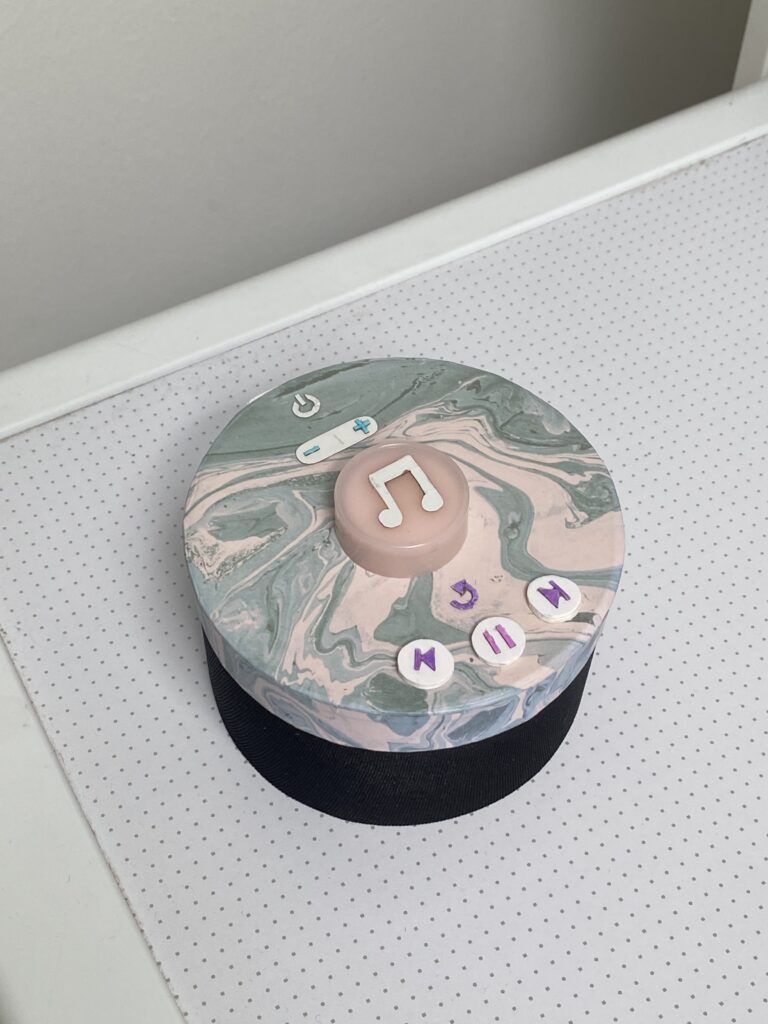
              After spending some weeks developing a technical prototype, I started building a visual one as well. The visual prototype represents the size and appearance of my concept, but serves no functionality. It is made of paper, cardboard, plastic, tape and fabric. 

              I started drawing some sketches of the intended design. In the blog post Concept Definition and Aim from May, I stated what buttons I find important to include. I worked further with these and concluded to implement seven buttons: 

              • Power on/off
              • Sound up/down
              • Play melody/record
              • Replay melody
              • Return to previous melody
              • Pause melody
              • Skip to next melody

              I want the design to be clean and understandable, without any unnecessary buttons. But after my user tests, I also understood that buttons such as replay and skip were crucial in order to serve good user experiences. 

              The lower part of the product is the speaker, and the upper part involve the buttons. The biggest button in the middle is the one that will be used the most. When it is pressed, the random generated melody plays. This is also the button that must be pressed in order to record the sound of the user input. In the next version of my prototype, I will also include a LED ring around that gives instant feedback on the input. 

              19 | User Testing

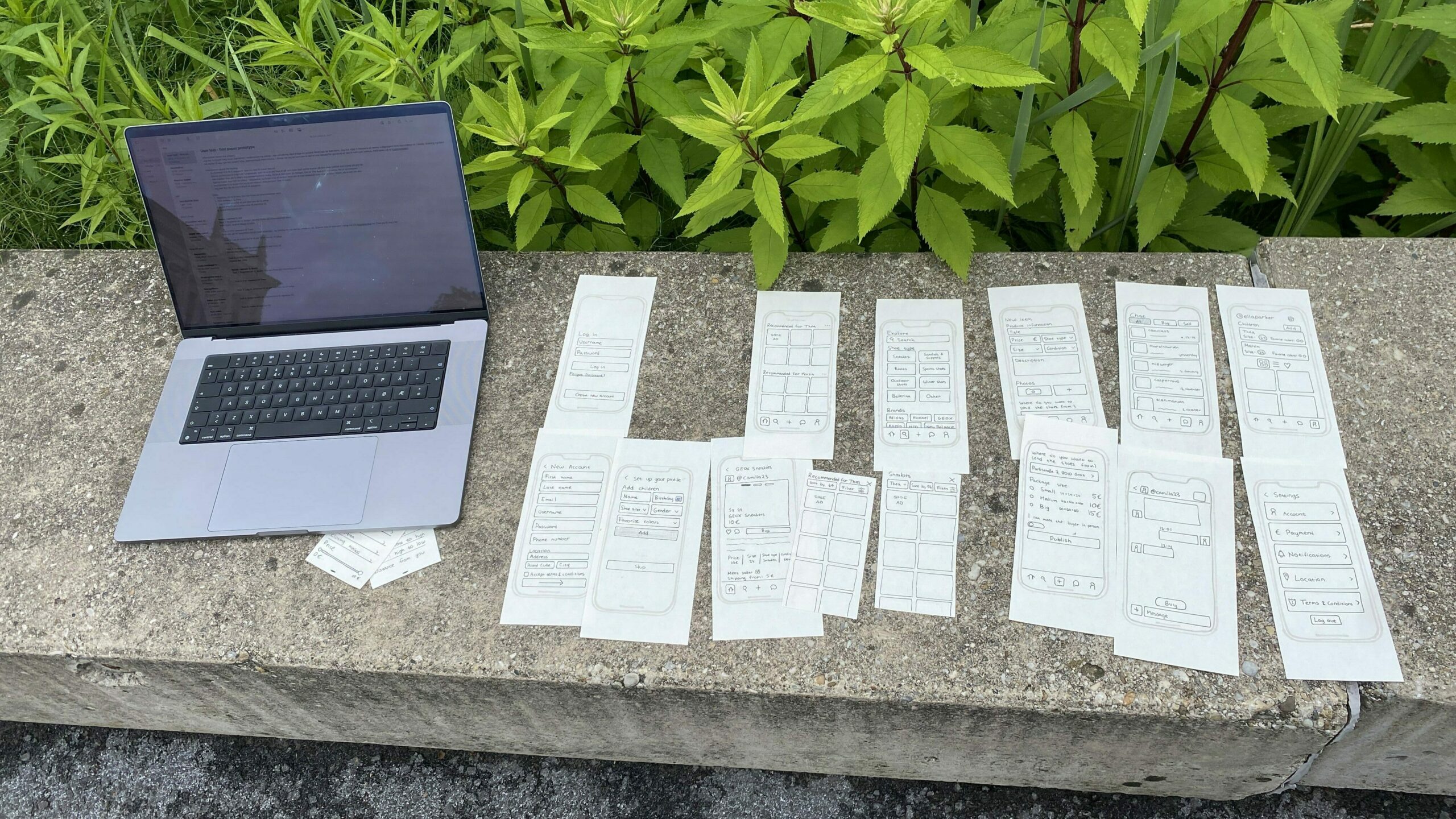
              I conducted two user tests with the paper prototypes so that I could get feedback and recommendations before creating a prototype in Figma. The testers first got some brief information about the project before I presented how the test was going to be conducted. The test consisted of five tasks where different features were involved so that I could understand how the different elements are perceived from others.

              • Is the content understandable and intuitive?
              • How is the interaction of specific elements perceived?
              • When there are multiple ways to solve a task, which one is preferred?

              My setup during the user testing

              The two people testing the prototype are females in their twenties. Both of them are tech-savvy and have used second-hand apps before.

              1. Register a new user (you can make up the information yourself).
              2. Find sneakers for Thea.
              3. Create an ad for a pair of shoes you want to sell.
              4. Change Martin’s shoe size to size 25.
              5. Change your location.

              Task 1: Went quickly, understood how to add a child.

              Task 2: Went straight to a specific ad on the home screen, which happened to be a sneakers ad. Didn’t realize you could click on „recommended for Thea“ to see more options.

              Task 3: Went well.

              Task 4: Did it via the home screen.

              Task 5: Profile page -> then settings.

              Task 1: Went quickly. Understood ad child. No problems

              Task 2: Went to explore, and then sneakers, and saw that it was already set to Thea.

              Task 3: Created the ad without problems. Fast

              Task 4: Went to profile page and clicked on his shoe size

              Task 5: Went to profile page and then settings and clicked on location

              • It is not clear that it is possible to click on the “recommended for Thea” to find a more detailed display. Need to make that section look clickable
              • Changing the shoe size of a child can be done two ways and both paths were used by the test subjects.
              • Most tasks were conducted without any problems.

              It was slightly challenging to conduct the tests alone. There is a lot to organize when doing tests with paper prototypes and the organizing can sometimes take the focus away from observing the tests. I also wanted to take notes along the way, but it was too challenging to do both that, observe and organize the paper prototypes. Next time I would want to get help from others to take notes and observe.

              🩴 🥿 👠 👡 👢 👞 👟 🥾 🩴 🥿 👠 👡 👢 👞 👟 🥾 🩴 🥿 👠 👡 👢 👞 👟 🥾 🩴 🥿 👠 👡 👢 👞

              I will work on the findings, implement some changes and create a prototype in Figma for the big reveal in the last blog post.