Double Diamond #9 // 20 years of the Double Diamond and a glimpse into the future.

https://www.youtube.com/watch?v=5FpKuJSCbx0

Our aim was to open up how we talked about design, to make that process accessible in a simplified way. We built directly on the shoulders of so many process-modelling designers, so watching its adoption and adaptation is an inspiring reflection of that flow. We never anticipated that this particular model would have so much impact, be so repeated and widely taken up by the industry, especially by non-designers.

Gill Wildman
Founder Upstarter Incubator,
Member of the Design Council team who published the Double Diamond

20 years of Double Diamond

The Double Diamond, created by the Design Council in 2003, marked its 20th anniversary last year. This iconic design process model has become a global standard, widely used by different organisations. The framework simplifies the design process into four key phases, as we already discovered, guiding both designers and non-designers through a structured approach to problem-solving and innovation.1

Key Milestones and Impact

  • Launch and Adoption: Since its inception in 2003, the Double Diamond has been embraced by numerous design courses and organisations worldwide. It provides a clear, visual representation of the design process, making it accessible and easy to understand.
  • Global Influence: The model has millions of references on the web and has been integrated into the workflows of many well-known entities, helping tackle a wide range of social, economic, and environmental challenges.
  • Extensions and Adaptations: Over the years, the Design Council has developed additional tools based on the Double Diamond, such as the Framework for Innovation and the Systemic Design Framework, to address more complex, systemic issues. And other companies have developed their own systems from it, which they use successfully.
  • Creative Commons License: To celebrate the 20th anniversary, the Design Council has made the Double Diamond available under a Creative Commons license, allowing free use and adaptation. They have also partnered with Mural, a digital collaboration platform, to offer an online template of the Double Diamond. This initiative aims to facilitate its use in digital and remote settings. I would definitely like to take a closer look at this for my project and prototype.
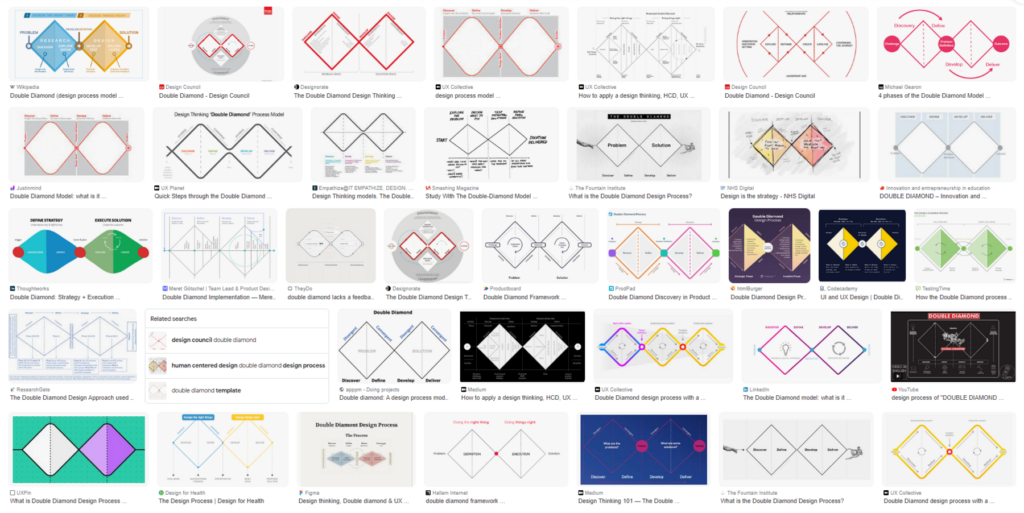
Double Diamond Examples
https://www.designcouncil.org.uk/our-resources/the-double-diamond/history-of-the-double-diamond/

A Glimpse into the Future

As the Double Diamond enters its third decade, the Design Council continues to adapt and expand the framework to meet contemporary challenges. The Systemic Design Framework is one such evolution, aiming to address complex, interconnected issues such as climate change, social inequality, and other global challenges. This new framework builds on the principles of the Double Diamond but provides a broader, more flexible approach to systemic problems.2

Systemic Design Framework
https://www.designcouncil.org.uk/our-resources/systemic-design-framework/

The Systemic Design Framework is a powerful tool that helps designers create innovative methods and tools tailored to their specific needs. It is guided by six key principles: focusing on people and the planet, zooming in and out to see the big picture and details, testing and evolving ideas, embracing diversity, fostering collaboration, and promoting circular and regenerative practices. Designers take on four crucial roles: system thinker, leader and storyteller, designer and maker, and connector and convenor. The framework outlines four types of design activities: exploring, reframing, creating, and catalyzing. Additionally, it emphasises the importance of enabling activities like setting a vision, building connections, showing leadership, and storytelling to ensure continuous progress.3

The future of the Double Diamond therefore involves integrating it more deeply with other methodologies like Agile and Lean, ensuring it remains relevant in fast-paced and dynamic environments. Additionally, the focus is shifting towards making the framework even more inclusive and collaborative, ensuring it can be used effectively by diverse teams across different sectors. The Design Council is committed to continuously learning from the design community and adapting the Double Diamond to ensure it remains a valuable tool for innovation and problem-solving. They are exploring new ways to apply the Double Diamond in various contexts, ensuring it evolves with the changing needs of the world. And that’s the point where I want to start and contribute as well.

  1. https://www.designcouncil.org.uk/fileadmin/uploads/dc/Documents/Press_Releases/The_Double_Diamond_turns_20_-_9_May_2023_Final.pdf ↩︎
  2. https://medium.com/design-council/the-double-diamond-design-process-still-fit-for-purpose-fc619bbd2ad3 & https://medium.com/design-council/developing-our-new-systemic-design-framework-e0f74fe118f7 ↩︎
  3. https://www.designcouncil.org.uk/our-resources/systemic-design-framework/ ↩︎

The Importance of Incorporating Kinesthetic and Tactile Learning Styles for Children with Cognitive Disabilities

Children with cognitive disabilities often face unique challenges in processing and responding to sensory stimuli. Understanding and catering to their specific learning needs can make a significant difference in their educational experiences and outcomes. Kinesthetic and tactile learning styles, which involve hands-on activities and physical movement, are particularly beneficial for these children. This blog post explores the importance of incorporating these learning styles, supported by recent studies and practical strategies.

Understanding Kinesthetic and Tactile Learning

Kinesthetic learners thrive on movement and physical activities. They learn best by doing rather than observing or listening. Tactile learners, on the other hand, benefit from using their sense of touch to explore and understand the world around them. These learning styles are crucial for children with cognitive disabilities, including those with Autism Spectrum Disorder (ASD), who often exhibit heightened sensory sensitivities.

The Benefits of Kinesthetic and Tactile Learning

Enhanced Sensory Processing

A study by Asmika et al. (2016) found that children with autism are more sensitive to tactile sensory stimuli compared to their neurotypical peers. This heightened sensitivity means they respond more intensely to touch and other tactile inputs. By incorporating tactile learning activities, educators can help these children engage with their environment in a controlled and supportive manner, aiding in sensory integration and reducing anxiety.

Improved Engagement and Focus

Children with cognitive disabilities often struggle with attention and focus, especially in traditional classroom settings. Kinesthetic and tactile activities, such as building models, engaging in role-play, or using manipulatives, can capture their interest and keep them engaged. These activities align with their natural preferences for movement and touch, making learning more enjoyable and effective.

Development of Motor Skills

Hands-on activities help children develop fine and gross motor skills, which are essential for daily living and academic tasks. For instance, activities like tracing letters in sand or playing with clay can improve fine motor control, while more extensive physical activities like obstacle courses can enhance gross motor skills. These skills are particularly important for children with cognitive disabilities who may experience motor coordination challenges.

Strategies for Incorporating Kinesthetic and Tactile Learning

Use Props and Hands-On Activities

Incorporate a variety of props and tactile materials into lessons. For example, use rubber bands and pegboards to teach geometric shapes or provide textured materials for art projects. These tactile experiences help children connect abstract concepts with physical sensations, reinforcing their learning.

Make Story Time Interactive

Turn story time into an interactive experience by having children act out scenes or use puppets and props. This approach not only makes the stories more engaging but also helps children understand and remember the content better through active participation.

Incorporate Movement Breaks

Regular movement breaks can help children maintain focus and reduce restlessness. Activities like jumping jacks, stretching, or a quick dance session can refresh their minds and bodies, making it easier for them to return to more structured tasks.

Combine Learning Modalities

Using a multimodal approach can cater to various learning preferences simultaneously. For instance, combining auditory and kinesthetic learning through music and dance can be highly effective. An example is teaching the alphabet with a freeze dance game, where children dance to a song and freeze when the music stops. This method engages multiple senses and keeps learning dynamic and fun.

Conclusion

Incorporating kinesthetic and tactile learning styles into the education of children with cognitive disabilities is not just beneficial but essential. These approaches align with their natural learning preferences, enhance sensory processing, improve engagement, and support motor skill development. By understanding and implementing these strategies, educators and parents can create a more inclusive and effective learning environment that meets the needs of all children.

By embracing these methods, we can ensure that every child has the opportunity to succeed and thrive in their educational journey, regardless of their cognitive abilities.

References:

https://mybrightwheel.com/blog/kinesthetic-learner

Asmika, Asmika, Lirista Dyah Ayu Oktafiani, Kusworini Kusworini, Hidayat Sujuti, and Sri Andarini. „Autistic Children Are More Responsive to Tactile Sensory Stimulus.“ Journal of Medical Sciences 50, no. 2 (2018).

Supporting Visual Learning Methods for Children with Cognitive Disabilities

Children with cognitive disabilities often face challenges in communication and learning. Traditional teaching methods might not always work for them, so it’s important to use special approaches that meet their unique needs. Visual learning methods are especially helpful in supporting their education and development. This article explores how visual learning works and shares some tools and resources that can make learning easier for children with cognitive disabilities.

Why Visual Learning is Important

Visual learning uses the strengths of children with cognitive disabilities, especially those with autism, who often think in pictures rather than words. Visual supports like photos, drawings, objects, and written words help communicate more effectively. Studies show that these visual aids can improve understanding, reduce anxiety, and enhance learning.

How Visual Learning Works

Visual learning helps by providing clear, simple representations of ideas. Children with cognitive disabilities may find it hard to understand verbal instructions. Visual supports make communication easier by turning words into pictures they can understand. This approach is part of Universal Design for Learning (UDL), which means using different ways to teach so everyone can learn.

Visual Learning Strategies

There are several visual learning strategies designed to help children with cognitive disabilities. These strategies focus on creating a predictable and supportive learning environment.

Visual Schedules

Visual schedules are key tools that show a clear plan for daily activities. They help children understand what will happen and when, reducing uncertainty and stress. Visual schedules can use pictures, symbols, or words to represent different tasks. For example, the Picture Exchange Communication System (PECS) uses visual schedules to help with communication and routines.

First-Then Boards

First-Then Boards are useful for teaching children to follow directions and complete tasks. This visual strategy shows a preferred activity (the „then“ task) that will happen after completing a less preferred one (the „first“ task). It helps motivate children to do tasks they might not like by showing what comes next.

Visual Prompts and Social Stories

Visual prompts and social stories are great for teaching social skills and managing behavior. Social stories provide visual explanations of social situations and appropriate responses, helping children understand social cues and expectations.

Combining Play and Formal Learning

While learning through play is crucial for development, formal learning is also important for core skills like reading, writing, and math. A balanced approach that includes both play and structured learning can be very effective. Various visual resources and activities support this mixed approach.

Modern Tools: Goally

Technology offers new solutions for visual learning. Goally is a tablet designed for children with cognitive disabilities, featuring visual schedules, task analysis, and reward systems in a user-friendly format. Goally supports independent learning and helps children manage their routines effectively.

References:

https://www.theautismpage.com/visual-learning

https://vkc.vumc.org/assets/files/resources/visualsupports.pdf

https://getgoally.com

Why Text-to-Speech with Highlighted Text is Crucial for Prototypes and Children with Cognitive Disabilities

For children with cognitive disabilities, traditional learning methods can often be challenging and frustrating. Reading long passages of text requires sustained attention, which can be particularly difficult for these students. TTS with highlighted text addresses this issue by providing an auditory learning experience that keeps students engaged. As the text is read aloud, each word is highlighted, allowing students to follow along visually and aurally. This dual-input method reinforces learning and helps improve comprehension and retention.

Reducing Cognitive Load

Children with cognitive disabilities often experience a higher cognitive load when processing text. The need to decode and comprehend text simultaneously can be overwhelming. TTS reduces this cognitive load by allowing students to focus on understanding the content rather than struggling with the mechanics of reading. Highlighting text as it is read ensures that students can keep track of where they are in the text, further reducing the mental effort required.

Supporting Multimodal Learning

Different students have different learning preferences. While some may excel with visual aids, others may find auditory learning more effective. TTS with highlighted text supports multimodal learning by combining auditory and visual elements. This approach caters to various learning styles, ensuring that all students have the opportunity to succeed. For instance, in an interactive table prototype, students can interact with the content in multiple ways, making learning more dynamic and inclusive.

Fostering Independence and Confidence

One of the critical goals in special education is to foster independence among students. TTS with highlighted text empowers children with cognitive disabilities to access information independently. They no longer need to rely solely on teachers or peers to read aloud to them. This autonomy boosts their confidence and encourages them to take charge of their learning journey. As they become more comfortable with using TTS tools, their self-esteem and motivation to learn improve significantly.

Text-to-Speech with highlighted text is more than just a technological feature; it is a bridge to a more inclusive and accessible education system. By reducing cognitive load, supporting multimodal learning, fostering independence, and broadening access to information, TTS with highlighted text has the potential to transform the learning experiences of children with cognitive disabilities. As developers and educators continue to innovate, incorporating such features in educational tools and prototypes will be crucial in ensuring that every child has the opportunity to learn and succeed.

References:

https://medium.com/engineered-publicis-sapient/creating-immersive-product-experiences-with-audio-and-animated-text-highlighting-in-react-9a88c9b2acd2

https://www.xda-developers.com/best-text-to-speech-extensions-browsers

https://www.metaview.ai/resources/blog/syncing-a-transcript-with-audio-in-react

Reflexion & Ausblick

Ich habe Design & Research genutzt, um mich näher mit Streetfotografie zu beschäftigen. Es war eine gute Möglichkeit für mich in dieses Thema einzutauchen. Wie das folgende Bild „Auf der Suche“ zeigt, kann Fotografieren eine gemeinsame Aktivität sein. Bei Spaziergängen bietet es sich immer an die Kamera mitzunehmen oder mal schnell das Handy zu zücken.

Das PILOT-System werde ich in Zukunft für meine Bilder nutzen. Als Trigger schweben mir verlassene Fahrräder vor. Ich möchte die Stadt nach alten, nicht mehr genutzten Rädern (bzw. nach deren Überresten) absuchen und daraus eine Fotoserie machen. Diese vergessenen Fahrräder sehe ich als Zeitzeugen des urbanen Lebens. Sie haben bestimmt schon viel erlebt und ihre ganz eigenen Geschichten zu erzählen. Ich möchte das Zurückgelassen werden und den Zerfall durch diese Räder abbilden. Achtung, es könnte melancholisch werden …

Ich wünsche euch einen wunderschönen, sonnigen Sommer! 😉

“Intergenerational Digital Storytelling” | 08.2 

Okay, I’ve decided that I’m done with my prototype. I’ve added the ‚Add Sibling‘ section, a questionnaire for that page, and how the Dashboard would look when you save those changes. I also created the possible ‚Add Grandparents‘ sections. Now, I’ll give it to some friends and colleagues to get their feedback. The next entry will most likely be about their feedback.

I am also looking forward to your feedback and I hope you don’t mind me having a more open approach with these blogs.

Meine Favoriten

Drei Tage lang habe ich nach bestimmten Farben (Gelb, Grün und Rot) in der Stadt gesucht. In diesem Blog möchte ich meine Favoriten mit euch teilen. 

Bild 1:

Dieses Foto wurde am Grazer Hauptplatz aufgenommen. Die Farbe Rot hat mich sehr inspiriert, da sie einem sofort ins Auge springt. Noch interessanter wird das Bild für mich, wenn ich das Foto schwarz weiß mache und die Farbe Rot dadurch noch mehr hervorgehoben wird:

Bild 2:

Dieses Foto habe ich von der Brücke aus gemacht. Ich fand es spannend die Komposition genau in der Mitte schräg zu teilen. Der Mann sitzt in dieser Komposition im mittleren, linken Drittel.

Ich möchte allen, die sich für Streetfotografie interessieren, das Buch “Mit offenen Augen” ans Herz legen. Das Thema wird sehr anschaulich mit vielen Beispielbildern erklärt. Außerdem werden einem Übungen näher gebracht, die wirklich Spaß machen beim Umsetzen.

Hier gehts zum Buch: https://www.thalia.at/shop/home/artikeldetails/A1061545257?ProvID=11010474&gad_source=1&gclid=CjwKCAjw1emzBhB8EiwAHwZZxYFJKf9w4yD1FwMq1kClx4eswKg4qbGrNk33TAqW4bTKI2EipLYEsxoCDaQQAvD_BwE

Viel Freude beim Fotografieren!

“Intergenerational Digital Storytelling” | 06.2

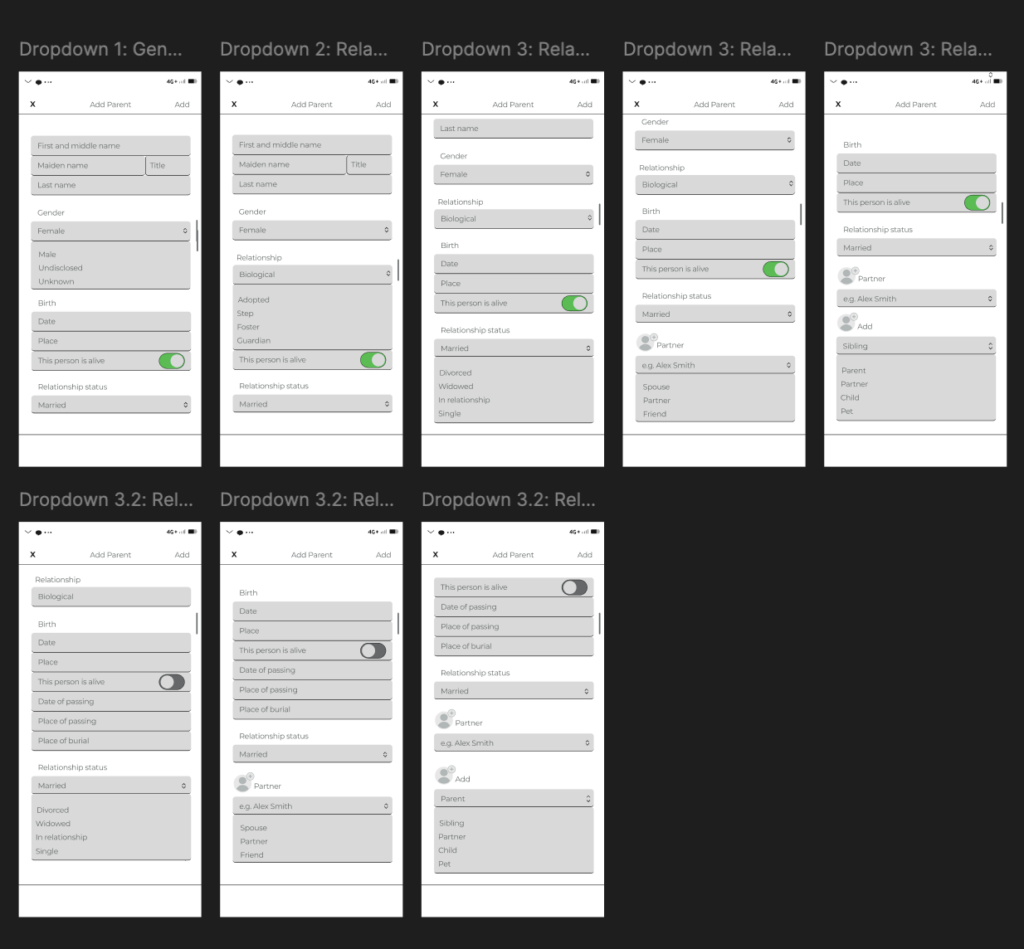
I did the best I could for the dropdown menus for now. You can see the options that the dropdown menus have, but you can’t choose any of the given options yet—I still need to figure out how to do that on my own, of course, because I still refuse to watch any tutorials. Don’t ask me why; I obviously don’t like myself, haha. 🥲

I don’t think I’m finished with this part and the options within the dropdown menus because I think there will be more follow-up questions depending on what option you choose within the dropdown menu—if that makes sense? I hope it does. Before I went too far down the rabbit hole, I remembered that this is supposed to be my *first prototype*, so honestly, what I have from the options is just enough for now. At least for me.

Next, I’ll work on the ‚My Profile‘ section, and maybe ‚Add a Sibling‘ and ‚Add a Grandparent.‘ We’ll see where the night takes us!

‚Till next entry, poyi!

UX Analysis of Vanlifezone.com

In our UX design class we had the opportunity to utilize eye tracking technology for analyzing physical or digital objects and products. I chose to use Vanlifezone.com for this analysis, in order to gain qualitative insights into how users interact with the website.

User Testing for Vanlifezone.com

The user testing aimed to understand user interactions with Vanlifezone.com and identify areas for improvement. We employed eye tracking and the „thinking aloud“ technique. Three participants engaged in a series of tasks designed to evaluate the website’s usability and specific functionalities.

Methodology

Each participant completed a 20-minute guided session with indirect eye tracking activated. They navigated through the website and completed tasks while verbalizing their thoughts. This approach provided both eye tracking data and secondary insights from their commentary. The team consisted of a moderator, a technician, an observer, and a documentarian, ensuring smooth operation and thorough documentation.

Tasks

Participants were asked to:

  1. Explore the landing page to understand the website’s purpose.
  2. Find an article of interest.
  3. Share an article with a friend.
  4. Order a physical copy of the magazine.
  5. Access the Vanlifezone map and its information.
  6. Find camping restrictions at Lunzer See.
  7. Locate the closest campsite and garage for repairs at Lunzer See.

Due to software limitations, tasks involving the map functionality were excluded from the testing process.

Participants

  • Vanessa Stöckel (f, 27): Easily confused, adventurous, prefers camping.
  • Molly Gibson (f, 25): Multinational, highly active, prefers Airbnb.
  • David Laßlberger (m, 24): Gamer, indecisive, prefers hotels.

Observations

  • Engagement with Content: Participants frequently navigated towards articles and magazines, indicating high interest in content. However, all participants experienced confusion regarding the differentiation between „articles,“ „stories,“ and „journal“ sections.
  • Navigation and Usability: General navigation was found to be less intuitive, with issues like unexpected menu locations, difficulty in closing the menu, and unclear navigational links. Vanessa and Molly had trouble finding how to order a physical magazine, while David found the navigation structure non-intuitive.
  • Visual Design and Aesthetics: Participants reacted positively to the visual design, although text readability and color contrasts were criticized.
  • Specific Functionality Issues: Features like „Support Vanlifezone“ or „Distribute Magazine“ were not easily located. The map and magazine ordering features posed significant usability challenges.

Findings

  • High Engagement with Articles: Participants were drawn to articles and banners, especially those with large graphics.
  • Navigation Needs Improvement: The website’s navigational structure and menu interactions need enhancement.
  • Physical Magazine Ordering: There should be clearer paths to find and order physical copies of the magazine.
  • Text Readability: Improvements in text size, color, and contrast are necessary for better readability.
  • Content Categories: Clear differentiation between „articles,“ „stories,“ and „journals“ is needed to avoid confusion.
  • Interactive Elements: Addressing the usability of interactive elements like the map and ensuring all clickable elements meet user expectations would significantly improve user experience.

Conclusion

The eye tracking and „thinking aloud“ analysis of Vanlifezone.com revealed several areas for improvement in terms of navigation, content differentiation, and interactive elements. Addressing these issues will enhance user experience and engagement with the website.