End of the semester and end of my prototyping journey with Tap in the field of Calm Technology for now. After finishing a polished interface to control Tap, I created an explanatory video about the process of prototyping on Tap and the final working features, which you can watch below. Overall it was a fun experience to dive into this prototyping process and learn a thousand little things along the way, from running stepper motors to writing code for Arduino and that failure is part of the process. Now that it is all done, I would like to thank ChatGPT for helping me, a non-programmer, to code and DeepLWrite for turning my quickly scribbled blog post scripts into easily readable blog posts. Making this whole project possible.
For this blog post, I explored various materials that might be relevant to my research, including articles, papers, books, and more. While I aimed to prioritize scientific sources, I did not limit myself exclusively to them.
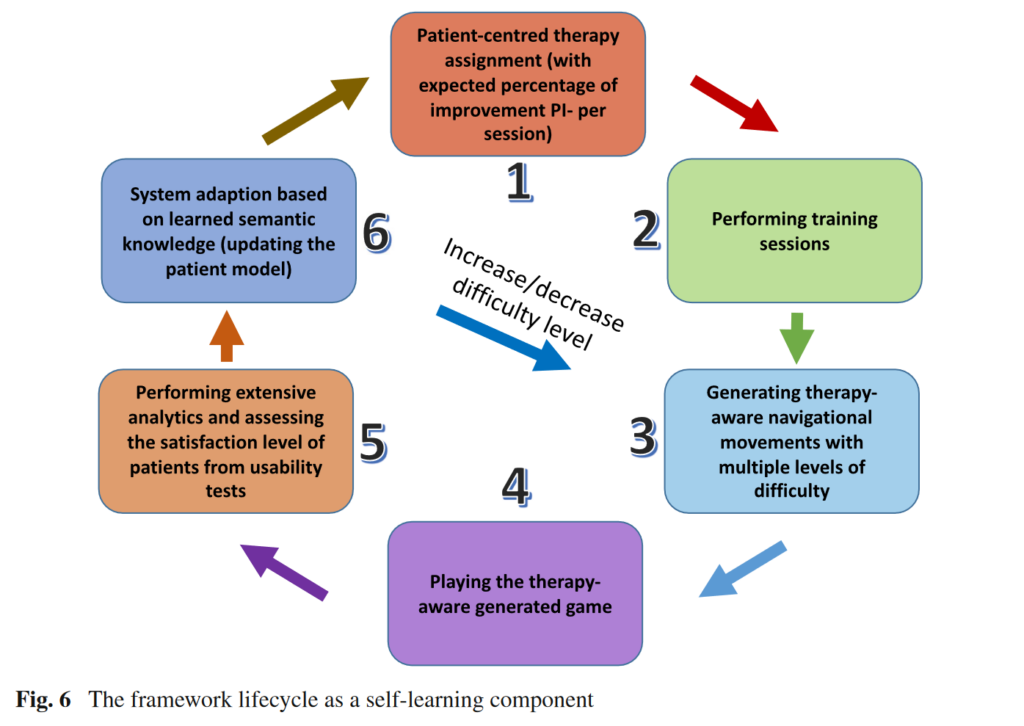
The first source I examined was a paper titled “A Therapy-Driven Gamification Framework for Hand Rehabilitation.” This paper presents an innovative e-health framework that uses adaptive serious games to facilitate hand rehabilitation for individuals with disabilities. Their end product was a serious game where players control an airplane or spaceship using the rotation and movements of their hands. What I found particularly intriguing was that the system accommodates users with vastly different levels of hand flexibility. According to the paper, the normal range for wrist flexion is 75°, but some individuals may only be able to flex their wrist up to 20°. The system can register these varying levels of flexibility and then devise a plan to gradually improve the patient’s ability through multiple steps. Additionally, I was interested to see that they used Leap Motion as the controller, a piece of technology we received a workshop on.
“Digitale Gesundheitsinterventionen” was an extensive and challenging read. It covers various digital health interventions and options, with gamification being more of a side topic. The main focus is on IMIs, or “internet- und mobilbasierte Interventionen” (internet- and mobile-based interventions). Nonetheless, it was insightful to browse through the book as it addresses a wide range of health problems. There are also dedicated chapters on specific target groups, such as the peculiarities of childhood and adolescence. I found the chapters on “Persuasive Design” and “Ethische Risiken” (ethical risks) particularly insightful.
The paper “Gamification in Musculoskeletal Rehabilitation” caught my interest because it focused on analyzing the general usefulness of gamified approaches. Seven articles were analyzed, and the results showed that gamification can be genuinely beneficial and is not just a novel idea without real merit. Since I am considering this topic for my master’s thesis, it was important to me to find data that provides a solid basis for argumentation.
I also read passages from “Making Points the Point: Towards a History of Ideas of Gamification,” “Rethinking Gamification,” and “Actionable Gamification” by Yu-Kai Chou. These reads focused more on gamification in general and less on health. I skimmed through them, reading passages that seemed interesting. However, I am not yet sure whether I will include them in my further research as they did not seem as directly applicable as others might.
I believe it is important to continue conducting traditional research alongside these more hands-on explorations.
Sources:
Afyouni, Imad, Faizan Ur Rehman, Ahmad Muaz Qamar, Sohaib Ghani, Syed Osama Hussain, Bilal Sadiq, Mohamed Abdur Rahman, Abdullah Murad, and Saleh Basalamah. “A Therapy-Driven Gamification Framework for Hand Rehabilitation.” User Modeling and User-Adapted Interaction 27, no. 2 (June 2017): 215–65. https://doi.org/10.1007/s11257-017-9191-4.
This has been a very fun project to explore, and i have learned a lot about conducting research through the last two semesters. For my final learnings from this, I could have spent more time conducting interviews with people in the field, and have finished testable prototypes earlier, so that i could have conducted more in-depth user-testing.
However I am still happy with the end result, as can be seen in the video above.
In this blog post, I want to explain my process behind starting the prototyping phase.
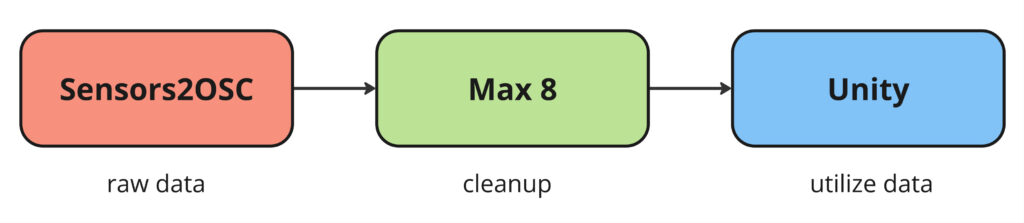
A lot of considerations and decisions had to be taken into account for this project. Since it wasn’t clear to me what I wanted to do exactly, I started with a technical feasibility-first approach. It was clear that regardless of what I decided to do, I needed a way to track data and then utilize it somehow. Therefore, I decided to start by getting data from a tracking device to a game engine. I chose to use OSC (Open Sound Control) to transfer information from one device to another since we have been using it extensively during our studies, and I already have a good grasp of the concept.
For the tracking device, I chose my phone (Samsung Galaxy S23, running One UI 6.1, Android 14) and the app Sensors2OSC (not available on the Play Store, but the .apk can be downloaded from their website https://sensors2.org/osc/, and it can also be installed via F-Droid). For the game engine, I chose Unity because I am already familiar with it, whereas something like Unreal would require time to get used to.
To get the OSC data into Unity, I used an external framework. After some research, I narrowed it down to these two choices:
Ultimately, I decided on OscJack for several reasons. It was very lightweight (unlike extOSC, which comes with a lot of features), well-documented, and relatively new. Furthermore, keijiro has a good reputation in the GitHub/Unity community.
With this settled, I started to create a simple technical proof of concept in Unity.
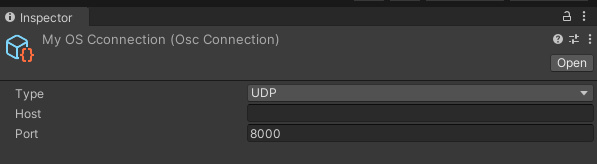
OscJack comes with an OSC Connection component where you can define the type of message, host address, and port. The host is left empty because it is acting as a receive-only connection right now.
The scene in Unity is very simple. The only necessary object is the GameObject titled “OSC Event Handler,” which has the OSC Event Receiver script attached to it.
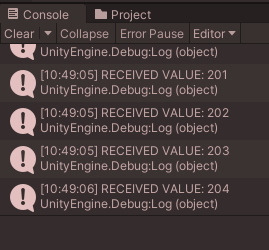
This script allows you to receive data and invoke a Unity Event that utilizes this data. For testing purposes, I created a simple script that outputs a text message and the value to the console. In this case, I used a simple int, but other data types such as Vector3 are also supported.
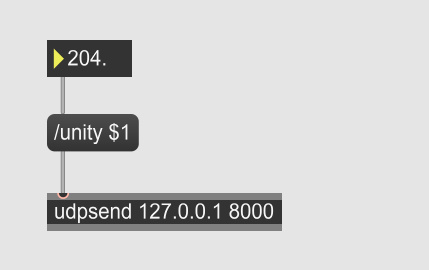
To quickly test if the setup was working, I created a Max8 file that sends an integer to Unity. It worked almost instantly without much troubleshooting.
It should also be noted that a dedicated OSC monitor exists, which may prove very helpful for debugging in the future. Also if anybody is wondering why my Unity windows appear reddish – it is because I set it up so the colors is changed while in play mode. Can definitely recommend so that no changes are lost.
In the final step, I added my phone to the process. I sent the data from my phone into Max8 and from there into Unity.
I probably could have done this without Max8 as an intermediary, but it is a very useful tool as it allows for rapid prototyping and easy cleanup of the data before handing it to Unity.
To have a backup system in place and to also allow me to work on multiple devices (as I work on both a laptop and a PC), I set up a GitHub repository for this project.
This was an important first step in getting a functional prototype working. In my next blog posts, I want to explore the concept and idea behind a potential prototype rather than focusing on technical details.
In this blog post, I want to explore the existing approaches to gamification in the field of physical therapy. The goal is to identify current methods, examine the problems they solve, and determine the contexts in which they are most effective.
Additionally, I wish to investigate the question: “What kinds of data can be tracked and utilized in creating a gamified experience?” Depending on the technology used, a diverse array of factors can be monitored, including:
Steps, GPS location, distance traveled
Heart rate
Calories burned
Altimeter (vertical distance)
Active minutes per day
Specific exercises/activities
Sleep time/quality
Gesture detection
Movement detection (x/y/z axis)
Accelerometer
Some specialized hardware can track even more specific metrics, such as:
Skin temperature
Breathing rate
Heat loss
Sun exposure (UV light)
All these different types of data can be used to create various applications. Here are some examples related to the healthcare industry. But first, a quick definition of „gamification“ is in order. To paraphrase, gamification is the use of game-design elements in a non-gaming context with the goal of enhancing a service by incorporating game-related features that support and enhance the user’s overall experience . Here are some services I found, listed in no particular order:
PreOperative Diet App (tracking of food intake)
Immersive VR games
Football goalie game
Catching coconuts that fall from above
Laundry sorting
Smartphone Apps
MySugr Junior app: An app for children and parents to track blood sugar levels for children with diabetes
Wii Fit: The Wii Fit Board has been used for several healthcare applications
Another novel form of gamification, though not perfectly aligned with traditional academic/health settings, is the use of pedometers and step counters by Game Freak and the Pokémon Company. Over the years, there have been many attempts to capture the sense of exploration from the Pokémon games and bring it into the real world. They have created extra devices to enhance the normal Pokémon game experience. For every seven steps you take, you generate one Watt. These Watts can be used to improve your friendship with your virtual companion, similar to a Tamagotchi, or to exchange for in-game items. The first of these devices dates back to 1998 with the release of “Pokémon Pikachu.” Later iterations included mini-games and a deeper connection to the main game. In 2016, Pokémon GO was released, which became hugely popular. While more of a game than a gamified app, it nonetheless encouraged physical activity.
While researching for this blog post, I gained several interesting insights:
It seems there are two (or more accurately three) approaches to gamified therapy. One could create:
Something to be used during training sessions
Something to be used at home
A holistic approach spanning both therapy sessions and exercise outside of a medical setting
Additionally, one can make the act of therapy rewarding by creating game-like applications for the exercises, or focus on the process as a whole and motivate users by showing them their progress through statistics, visuals, etc., and rewarding prolonged positive behavior.
Lastly, I want to discuss potential obstacles or problems with a gamified approach to therapy. One common problem is longevity—the need to be motivating over a long period. In the context of physical therapy, it can be hard to predict how long treatment will last as it depends on the type of injury. Estimates can range from 2 weeks to 12 weeks or longer. Physiotherapy sessions typically last 30 minutes to 1 hour. Another aspect to consider is creating the right product for the target group. Children and teenagers are generally more open to a playful, game-like approach, while adults or elderly people may find these applications strange or childish. Additionally, if there is a need to store data externally on a cloud, privacy and ethical concerns are important. For example, BetterHelp had to pay $7.8 million for selling sensitive mental health information to Facebook and other marketing companies.
At this point, I could delve further into detail, but I think this is a good place to conclude for now. Designing a gamified experience, especially in healthcare, requires careful consideration. As designers, we need to be aware of these considerations to create the best possible product that can truly help people.
After experimenting with AI voices and creating audio-reactive visuals for different languages, the next step is to analyze the outcomes in detail. Here’s how I approached the analysis and what I discovered.
Collecting and Comparing Data
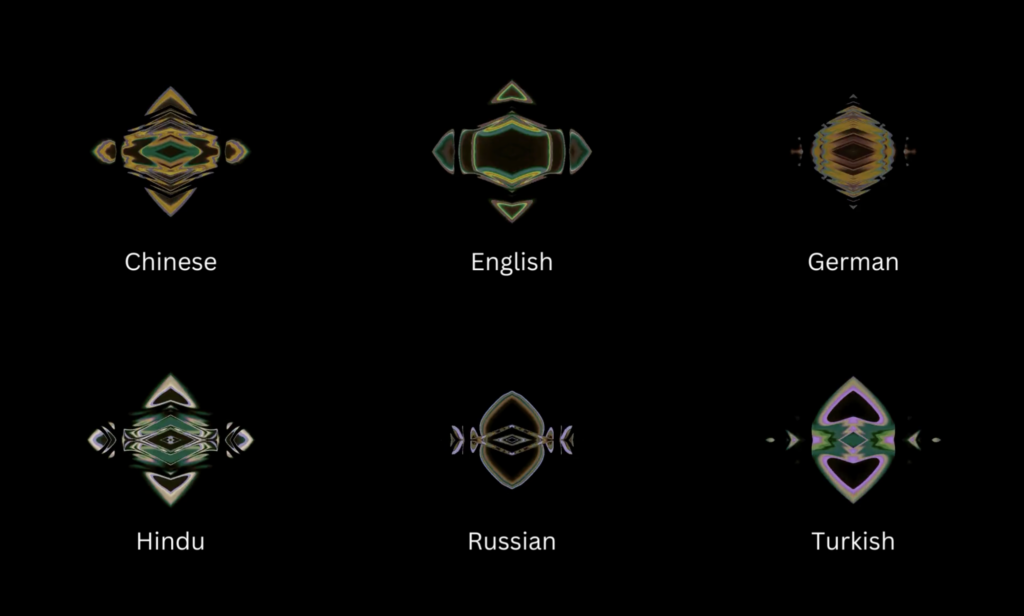
First, I recorded of the visuals for each language and phrase under consistent conditions. By placing these visuals side by side, I could directly compare them. I looked for patterns, shapes, and movements unique to each language, paying special attention to how the visuals reacted to specific sounds, particularly vowels and consonants.
Observations and Differences
During my analysis, I noted some differences:
German and English: Both languages produced clear, structured lines. However, German visuals had slightly more detailed patterns.
Turkish: Turkish visuals showed more fluid and continuous lines, reflecting its smooth flow and connected structure.
Russian: Russian visuals had a mix of sharp and smooth lines, showing its varied sounds and pronunciation.
Hindi: Hindi visuals displayed intricate and dense patterns, likely due to its mix of different sounds.
Chinese: Chinese visuals featured rhythmic, wave-like patterns, capturing the tones and unique structure of the language.
Here are some examples of the outcomes for „hello“ and „how are you?“:
German: „Hallo, wie geht’s?“ – Clear and structured lines with some complexity.
English: „Hello, how are you?“ – Similar to German but slightly less complex.
Analyzing the audio-reactive visuals revealed subtle yet fascinating differences between languages. Each language’s phonetic characteristics influenced the visuals in unique ways. Moving forward, I want to gather some feedback from people around me where these visuals can be used and what they think about the visuals so far.
In this starting phase I decided to focus on a simple math exercise. Following the exercise from start to finish, I tried to simulate what a lesson using a tool like this would look like.
Step-by-Step Breakdown of the Math Exercise
Upon starting the session, students are greeted with a welcome screen that prompts them to select a subject. This screen features four main subjects: Math, Reading, Writing, and Let’s Play.
Why? According to educational research, offering a choice increases student motivation and a sense of control over their learning. The visual representation of each subject helps young learners easily navigate and select their preferred activity.
Finding the Help Button
On every screen, there’s a little question mark (?) in the corner. When you click on it, a helpful message pops up to explain what you need to do next.
Why? Sometimes, we all get a bit confused or forget what to do. The question mark is like a friendly helper that’s always there when you need it.
Math Subject Selection
When the student selects „Math,“ they are taken to a new screen with six lessons, each represented by a numbered tile.
Why? Breaking down the curriculum into individual lessons helps in setting clear, achievable goals. Research shows that structured learning paths contribute to better knowledge retention.
Visual and Interactive Elements
The use of bright colors and large icons is based on research indicating that young children respond better to visually appealing and easily recognizable graphics. This enhances their ability to navigate the interface independently.
User Engagement
The interactive nature of the prototype encourages active participation rather than passive learning. Studies have shown that interactive learning can significantly improve student engagement and retention of material.
Conclusion
The first phase of the interactive learning table prototype for math exercises represents an integration of educational research and user-centered design. By focusing on interactivity, visual appeal, and structured learning, I wish to create a tool that not only supports academic growth but also fosters a love for learning among young students with cognitive disabilities. As I move forward, I will continue to refine and expand the functionality based on user feedback and ongoing research in educational technology.
After making the visuals audio-reactive with alphabet audios, I used AI to see if there were any noticeable changes when it comes to words and sentences.
I wanted to test phrases like „hello“ and „how are you?“ in various languages like: German, English, Turkish, Russian, Hindi, and Chinese. Unfortunately, the AI tools I found were either not free or had limited trials, so I didn’t have many options. I chose one AI voice tool and one voice actor for each sentence in the different languages.
Prompts for AI
English: „Hello, how are you?“
German: „Hallo, wie geht’s?“
Turkish: „Merhaba, nasılsın?“
Russian: „Привет, как дела?“ (Privet, kak dela?)
Chinese (Mandarin): 你好,你好吗?(Nǐ hǎo, nǐ hǎo ma?)
Hindi: „नमस्ते, आप कैसे हैं?“ (Namaste, aap kaise hain?)
And here are few examples of visualization „Hello, how are you?“ :
It was kind of hard to realize the differences between languages just by looking at the visuals. However, the process was very interesting for me. I could see subtle variations in the patterns and reactions of the visuals to different sounds.
Next Step
In the next steps, I will analyze the outcomes in more detail. I want to see if I can pinpoint specific differences and understand how each language influences the visuals.
I am still experimenting the visuals but now, I will share how I made them audio-reactive in TouchDesigner.
I followed a tutorial and then downloaded Turkish and German alphabet audios to see how the visuals change with different letters. By working with individual letters, I can easily extend this to words and sentences later.
First Visual – Audio Reactive
I tried to make the first visual audio-reactive. I think this one fits best because it looks like an audio wave and a weird mouth. The lines are clear, so I can record or take screenshots of each letter. This clarity can help in analyzing it.
Applying Audio Reactivity to Other Visuals
After figuring out how to make the first visual audio-reactive, I applied the same process to the other visuals. Here are the results:
Next Step
I think I will go with the mirrored first visual. My next step is to use an AI voice and see how it looks with words and sentences. I’m excited to see how these visuals evolve and become more refined as I continue experimenting.